
So sánh: Cache truyền thống vs Cache Rules của Cloudflare
Các plugin cache phổ biến như WP Super Cache, W3 Total Cache, LiteSpeed Cache… sẽ tạo file HTML đệm và lưu tại máy chủ WordPress (thường là trong /wp-content/cache/). Tuy nhanh hơn việc xử lý động bằng PHP, nhưng request vẫn về server, tốn CPU/RAM.
Trong khi đó, Cache Rules của Cloudflare cho phép bạn cache thẳng HTML ở tầng CDN – nghĩa là người dùng nhận được file HTML từ server gần họ nhất mà không cần vào máy chủ WordPress. Đây là cách cực kỳ hiệu quả để giảm tải, đặc biệt với site có lượng truy cập lớn.
Hướng dẫn cấu hình Cache Rules trên Cloudflare
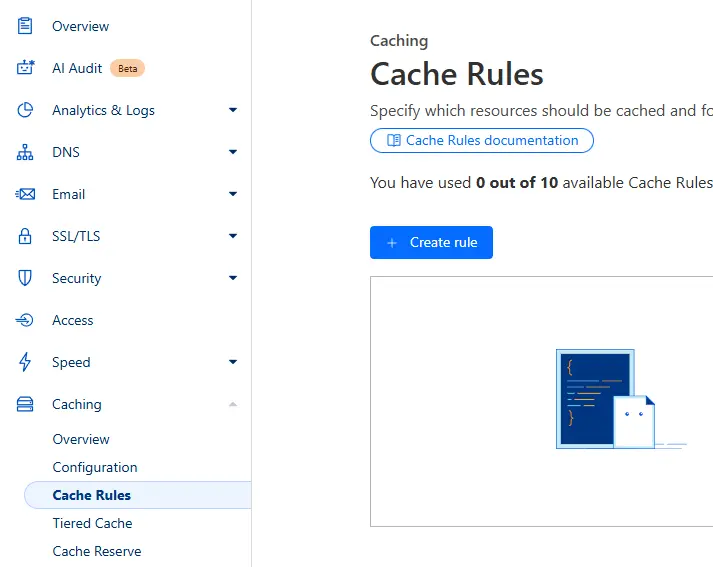
Truy cập vào Cloudflare Dashboard → Caching → Cache Rules → Create Rule.
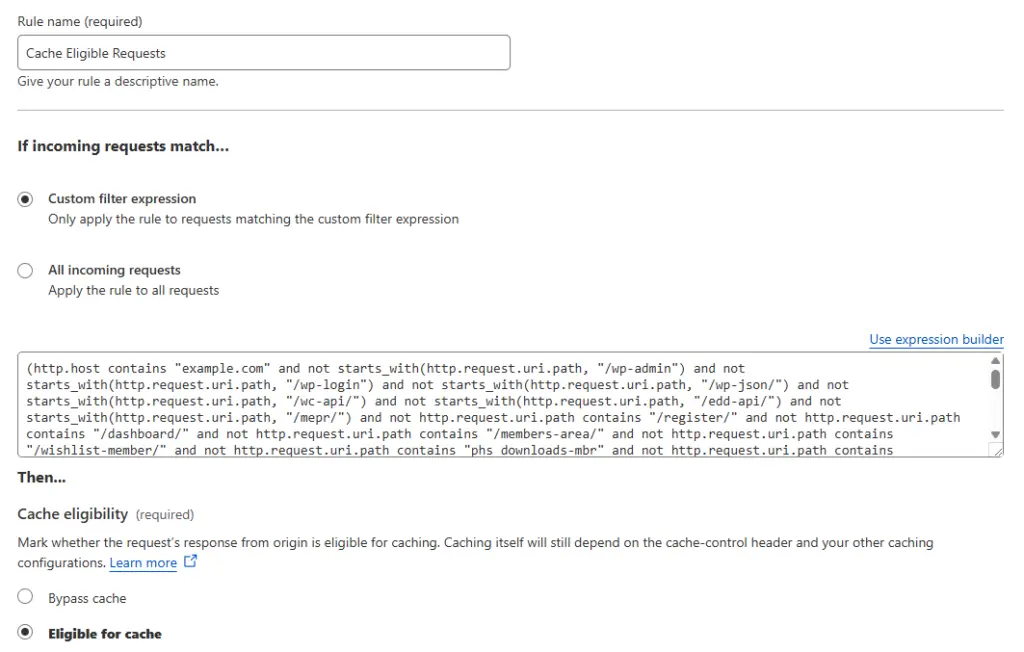
Đặt tên rule (ví dụ: Cache Eligible Requests) → bấm Edit expression và nhập điều kiện sau:
(http.host contains "example.com" and not starts_with(http.request.uri.path, "/wp-admin") and not starts_with(http.request.uri.path, "/wp-login") and not starts_with(http.request.uri.path, "/wp-json/") and not starts_with(http.request.uri.path, "/wc-api/") and not starts_with(http.request.uri.path, "/edd-api/") and not starts_with(http.request.uri.path, "/mepr/") and not http.request.uri.path contains "/register/" and not http.request.uri.path contains "/dashboard/" and not http.request.uri.path contains "/members-area/" and not http.request.uri.path contains "/wishlist-member/" and not http.request.uri.path contains "phs_downloads-mbr" and not http.request.uri.path contains "/checkout/" and not http.request.uri.path contains ".xsl" and not http.request.uri.path contains ".xml" and not http.request.uri.path contains ".php" and not starts_with(http.request.uri.query, "s=") and not starts_with(http.request.uri.query, "p=") and not http.request.uri.query contains "nocache" and not http.request.uri.query contains "nowprocket" and not http.cookie contains "wordpress_logged_in_" and not http.cookie contains "comment_" and not http.cookie contains "wp-postpass_" and not http.cookie contains "woocommerce_" and not http.cookie contains "wordpressuser_" and not http.cookie contains "wordpresspass_" and not http.cookie contains "wordpress_sec_" and not http.cookie contains "yith_wcwl_products" and not http.cookie contains "edd_items_in_cart" and not http.cookie contains "it_exchange_session_" and not http.cookie contains "comment_author" and not http.cookie contains "dshack_level" and not http.cookie contains "auth_" and not http.cookie contains "noaffiliate_" and not http.cookie contains "mp_session" and not http.cookie contains "xf_" and not http.cookie contains "mp_globalcart_" and not http.cookie contains "wp-resetpass-" and not http.cookie contains "upsell_customer" and not http.cookie contains "wlmapi" and not http.cookie contains "wishlist_reg")Ghi chú: Nhớ thay example.com bằng tên miền thực tế của bạn.
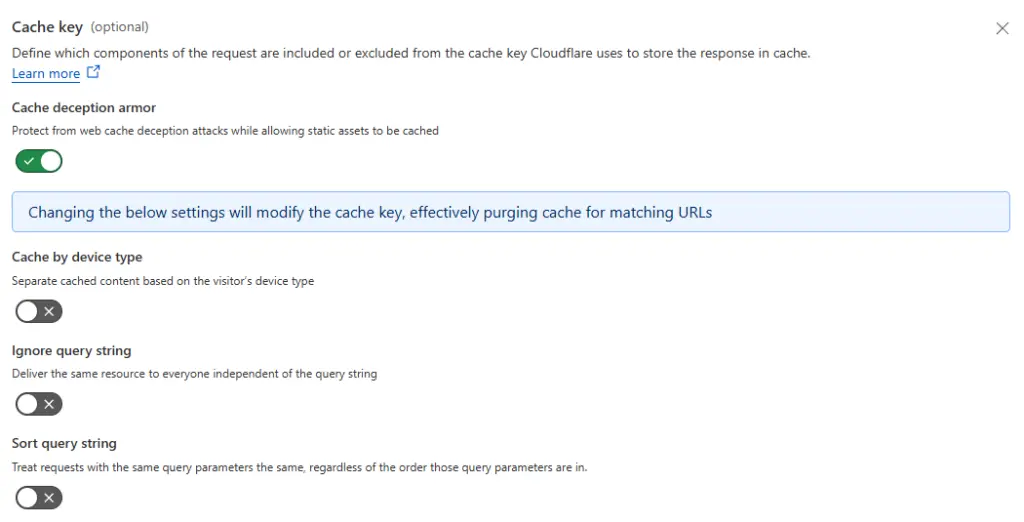
Ở mục Cache key, bấm Add setting và bật Cache Deception Armor để ngăn cache giả mạo.
Cuối cùng bấm Deploy để kích hoạt.
Tự động xóa cache khi có thay đổi nội dung
Theo mặc định, Cloudflare không biết khi nào nội dung trên site bạn thay đổi. Vì vậy bạn nên cài plugin chính chủ của Cloudflare trên WordPress để tự động purge cache mỗi khi đăng bài, chỉnh sửa, bình luận…
Sau khi cài, vào plugin, đăng nhập bằng Email + Global API Key (lấy tại trang API Tokens).

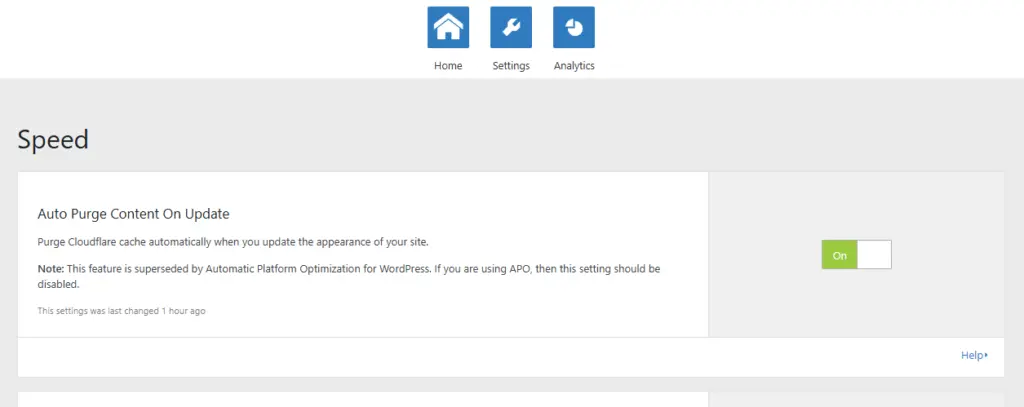
Tiếp theo vào phần Settings, bật Auto Purge Content On Update.
Cách kiểm tra Cache hoạt động đúng
Truy cập website ở chế độ ẩn danh, nhấn F12 → chuyển sang tab Network → load lại trang.
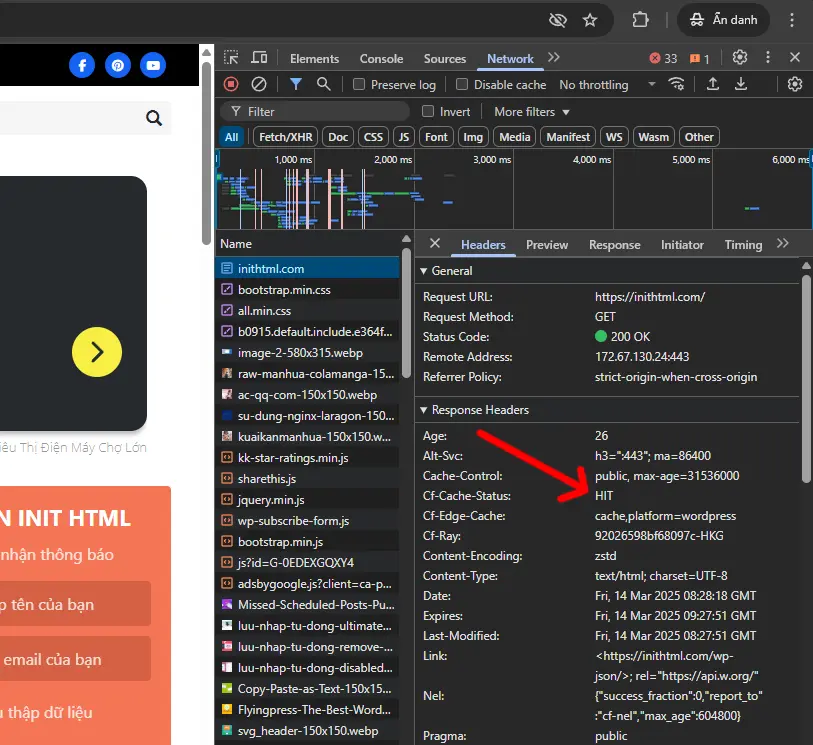
Chọn một file HTML → kiểm tra mục Response Headers. Nếu thấy Cf-Cache-Status: HIT nghĩa là cache đã chạy đúng.
Kết luận: Có nên dùng Cache Rules cho WordPress?
- Giảm tải CPU và RAM máy chủ.
- Giảm số request về server gốc.
- Tăng tốc độ phản hồi và trải nghiệm người dùng.
- Tiết kiệm chi phí hosting nếu site có traffic lớn.
Đây là một kỹ thuật nâng cao nhưng rất dễ áp dụng nếu bạn dùng Cloudflare. Với các site WordPress lớn, nhiều traffic – nên áp dụng ngay hôm nay để tối ưu hiệu năng bền vững.
Nếu bạn thấy bài viết hữu ích, hãy chia sẻ hoặc lưu lại để dùng về sau. Chúc các bạn thành công!








Bình luận