
Core Features
- Track views using REST API + Vanilla JS, bypassing bots and crawlers
- Prevent duplicate counts using session or localStorage
- Supports counting by total, daily, weekly, and monthly views
- Stores view counts in a custom meta key:
_init_view_count(no conflicts) - Beautiful shortcode UI with support for template overrides (like WooCommerce)
- Fallback thumbnail included if a post has no featured image
- Powerful filter/hook system for developers to customize behavior
- No tracking, no bloat, no custom tables — just pure postmeta and clean code
Flexible View Display with Shortcodes
The plugin includes two main shortcodes:
[init_view_count]: Display the current view count inside a post (supports total/day/week/month, format: raw/formatted/short)[init_view_list]: Show a list of the most viewed posts (customizable post type, category, tag, range, layout, class…)
You can customize number of posts, layout style, filter by category, tag, or post type. Templates can be overridden via your theme to fully match your site’s design. See the documentation: Using the shortcode in Init View Count (Vietnamese tutorial — use Google Translate to convert to your language).
Ready-to-Use REST API
Init View Count provides two REST API endpoints for easy integration with frontend apps or headless WordPress setups:
POST /wp-json/initvico/v1/count
Registers a view for a specific post (requires post_id).
GET /wp-json/initvico/v1/top
Retrieves the most viewed posts. See the documentation: Using the /top REST API in Init View Count (Vietnamese tutorial — use Google Translate to convert to your language).
Supported parameters:
range: one oftotal,day,week, ormonth(selects the time range for view counts)post_type: post type to query, defaults topostnumber: number of posts to retrieve (default: 5)page: which result page to return, used withnumberfor paginationfields:minimal(lightweight) orfull(detailed response)tax: taxonomy name (e.g.category,tag,genre)terms: comma-separated term slugs or IDs to filter byno_cache=1: disable caching to always return the latest data
Easy Template Overrides
You can override any display template by adding a file to your theme at:
your-theme/init-view-count/[template-name].phpExample override for a grid layout:
your-theme/init-view-count/view-list-grid.phpQuick Installation
- Download and unzip the plugin into
/wp-content/plugins/init-view-count/ - Activate it via the WordPress admin Plugins menu
- Go to Settings → Init View Count to configure options
- Use shortcodes in your content or widgets
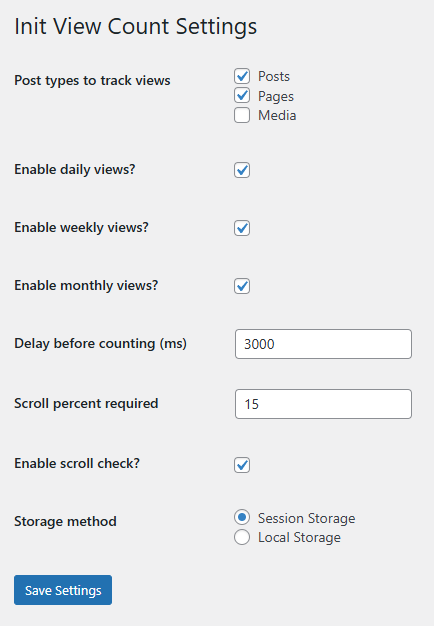
Init View Count’s simple yet effective setup interface.
Compatibility & Performance
- Compatible with WordPress 5.5+
- Tested up to version 6.8
- Requires PHP 7.4 or higher
- Works with major themes (Astra, Blocksy, Hello…)
- Uses Vanilla JS, no jQuery dependency
For Developers
Init View Count includes a wide range of filters and hooks to allow full customization:
- Control when and how views are counted
- Customize the WP_Query used by shortcodes
- Modify REST API output
- Adjust cache durations and behavior
See the documentation: Extending Init View Count with Filters & Hooks (Vietnamese tutorial — use Google Translate to convert to your language).
Get Started
Need a lightweight, precise, and extensible post view counter for WordPress? Init View Count is your ultimate solution.