Versions 1.5.x and 1.6.x take Init Live Search beyond basic site search — into a fast, customizable, developer-friendly system for WordPress sites of any size.
Watch live demo: https://youtu.be/nZocaTpi2hM
What’s New in Versions 1.5.x and 1.6.x
Version 1.6.x marks a major UI evolution for Init Live Search — introducing flexible interface customization and seamless integration with any theme or site layout. Built on the solid foundation of the 1.5.x series, it delivers both frontend polish and backend performance.
- Time-based analytics commands: New slash commands
/day,/week, and/monthshow the most viewed posts by day, week, or month (requires Init View Count plugin). - Default Slash Command: Automatically run a default slash command when the modal opens — either choose manually or enable “Smart Detection” to auto-select based on the current page.
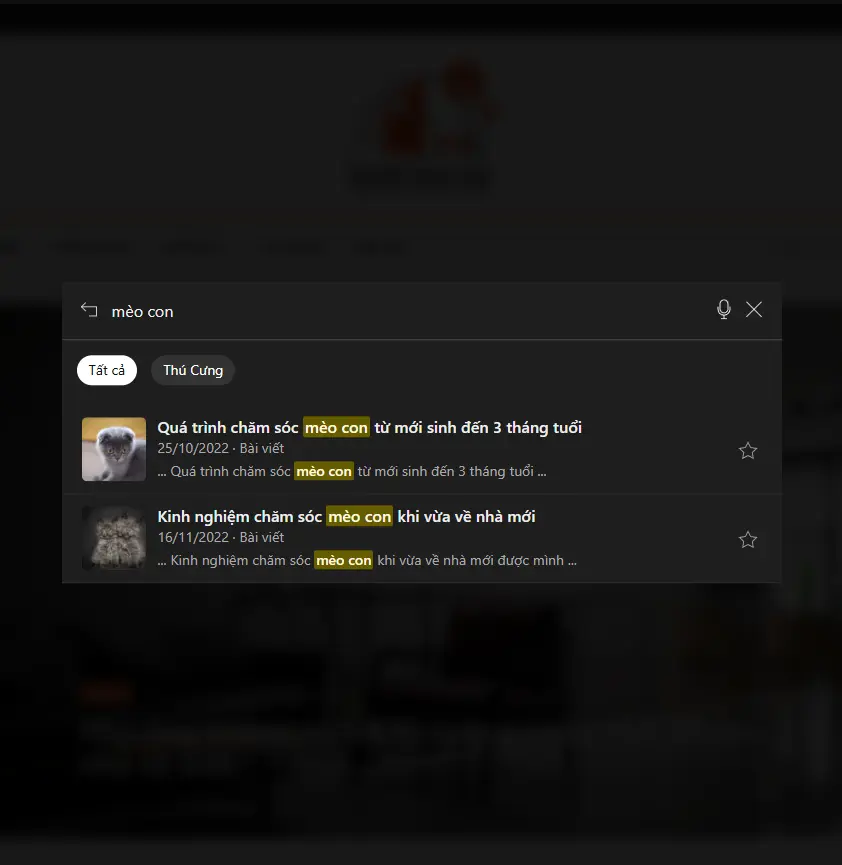
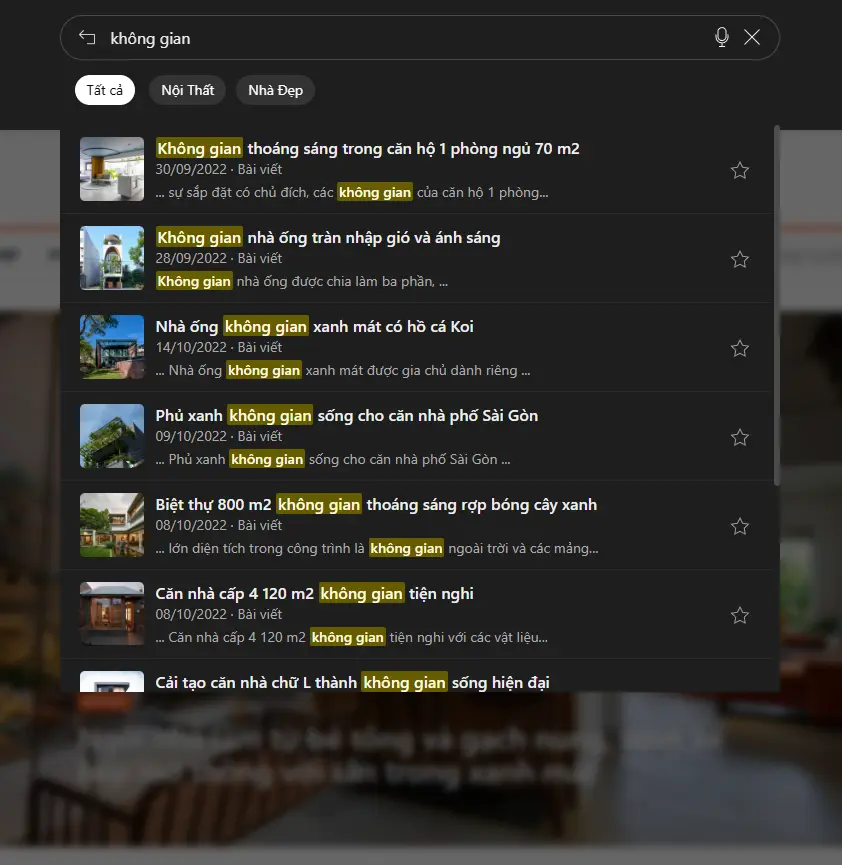
- Preset UI Styles: Choose from built-in UI styles like
style-full.css(full-screen modal) andstyle-topbar.css(floating topbar search UI). - Override & Custom Styles: Easily override the default styles by adding
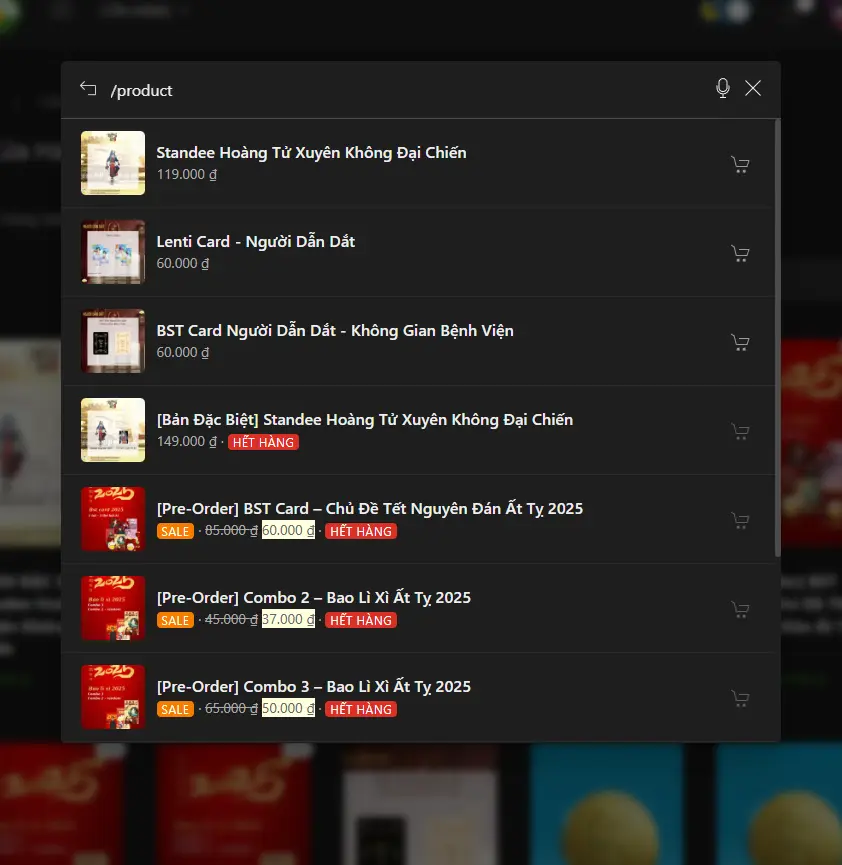
init-live-search/style.cssin your theme — or disable all built-in CSS to create your own from scratch. - WooCommerce-ready: Enhanced product search via slash commands like
/product,/on-sale,/stock,/sku, and/price— showing prices, sale badges, stock status, and Add to Cart buttons. - Search in SEO Metadata: Match queries against SEO Title and Meta Description fields from plugins like Yoast SEO, Rank Math, AIOSEO, The SEO Framework, and SEOPress.
- Init Smart Tag-Aware Search: Increases accuracy by combining post title and tags — with intelligent bigram-based fallback.
- ACF Field Search: Supports searching across selected ACF fields — only returns published posts, fully customizable via filters.
- Multilingual Support: Auto-detects current language via WPML or Polylang and filters results accordingly — no extra setup needed.
- Favorites & History: Manage favorite posts with
/fav, clear them with/fav_clear, and view recent search queries with/history— all stored locally, no login required. - Weighted Result Ranking: Prioritize results based on customizable weights between title, tags, SEO data, etc. — easily adjustable via filter hooks.
- Refactored Core & Performance: Entire JS codebase streamlined — lighter, less dependent on external scripts, and easier to integrate into modern themes or headless setups.
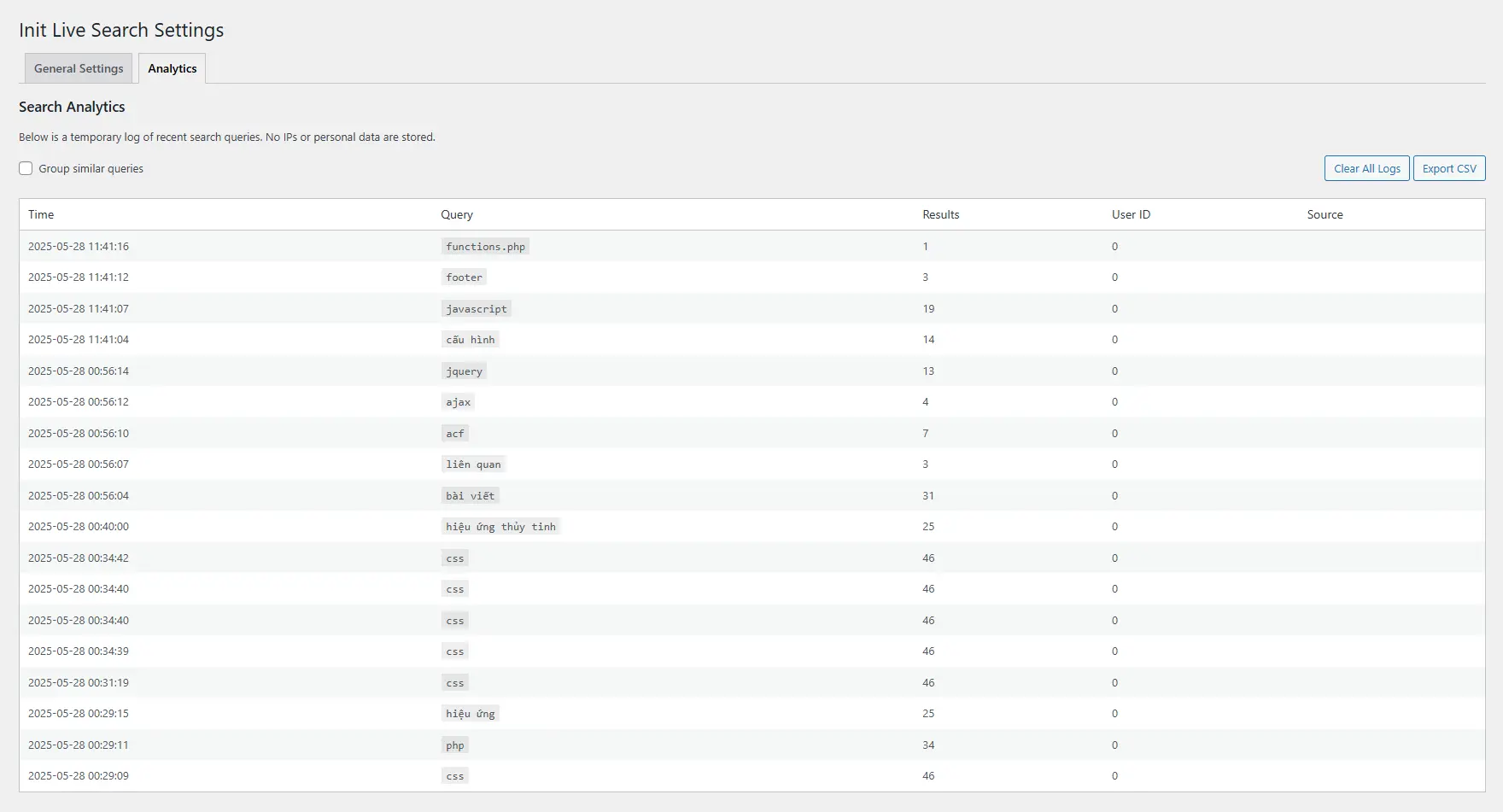
- Search Analytics: Track user queries directly in the admin — keyword stats, frequency, CSV export, no personal data stored.
- Custom Slash Commands & Click Tracking: Define your own slash commands from themes or plugins (via filter + JS event) and track when users click on results using the
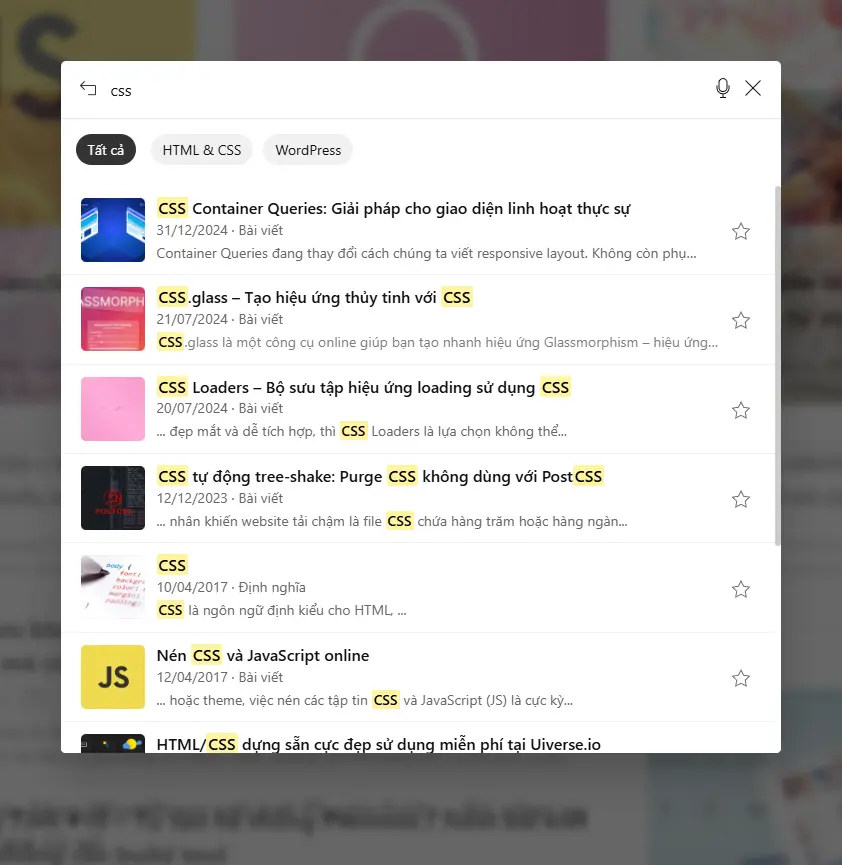
ils:result-clickedevent. - Smart Excerpt Highlight: Automatically generates a short snippet and underlines matching keywords from
excerptorcontent— making it easier for users to understand search context. - Smart fallback & stable REST output: Automatically splits long queries into individual terms and expands matches into SEO metadata — no setup needed. Ensures consistent response structure for smooth frontend rendering.
Key Features
High Performance, Zero Dependencies
Built entirely with Vanilla JavaScript — no jQuery, no third-party libraries. All search actions run through a custom, optimized WordPress REST API under the namespace initlise/v1. An intelligent debounce mechanism ensures minimal server load during fast typing.
Results, slash commands, favorites, and reading history are cached locally using localStorage to reduce repeated API calls and speed up the user experience.
Flexible UI with Preset Styles
Choose from built-in UI styles like full-screen (style-full.css) or topbar-style (style-topbar.css), or disable all CSS and create your own. You can also override the default design by adding a init-live-search/style.css file in your active theme.
Smart Suggested Keywords
Admins can manually define a list of suggested keywords or generate them automatically from existing post titles. The system intelligently removes stop words and highlights the most relevant terms for search discovery.
Full Keyboard Navigation & Shortcuts
- ↑, ↓: Navigate between results
- →: Add selected post to favorites
- ←: Remove selected post from favorites
- ↵ Enter: Open selected post
- Esc: Close the search modal
Note: Left/Right arrows only apply when a result is actively selected.
Advanced Search Capabilities
Powerful slash commands: view latest posts (/recent), filter by tags, categories, WooCommerce products, SKU, price range, and stock status. Fully extendable via REST API and custom filters.
Supports deep search into ACF custom fields and SEO metadata from plugins like Yoast, Rank Math, AIOSEO, SEOPress, and The SEO Framework — ideal for content-rich or structured websites.
Highly Compatible & Easy to Integrate
No need to modify your theme or insert shortcodes. The plugin auto-binds to any <input name="s"> field. You can also trigger the modal via keyboard shortcuts, HTML attributes, or even specific URLs.
Fully Responsive & Multilingual
The modal interface is fully responsive and works smoothly on all screen sizes. The plugin includes built-in support for English and Vietnamese, switching automatically based on your site’s language setting.
Simple Configuration
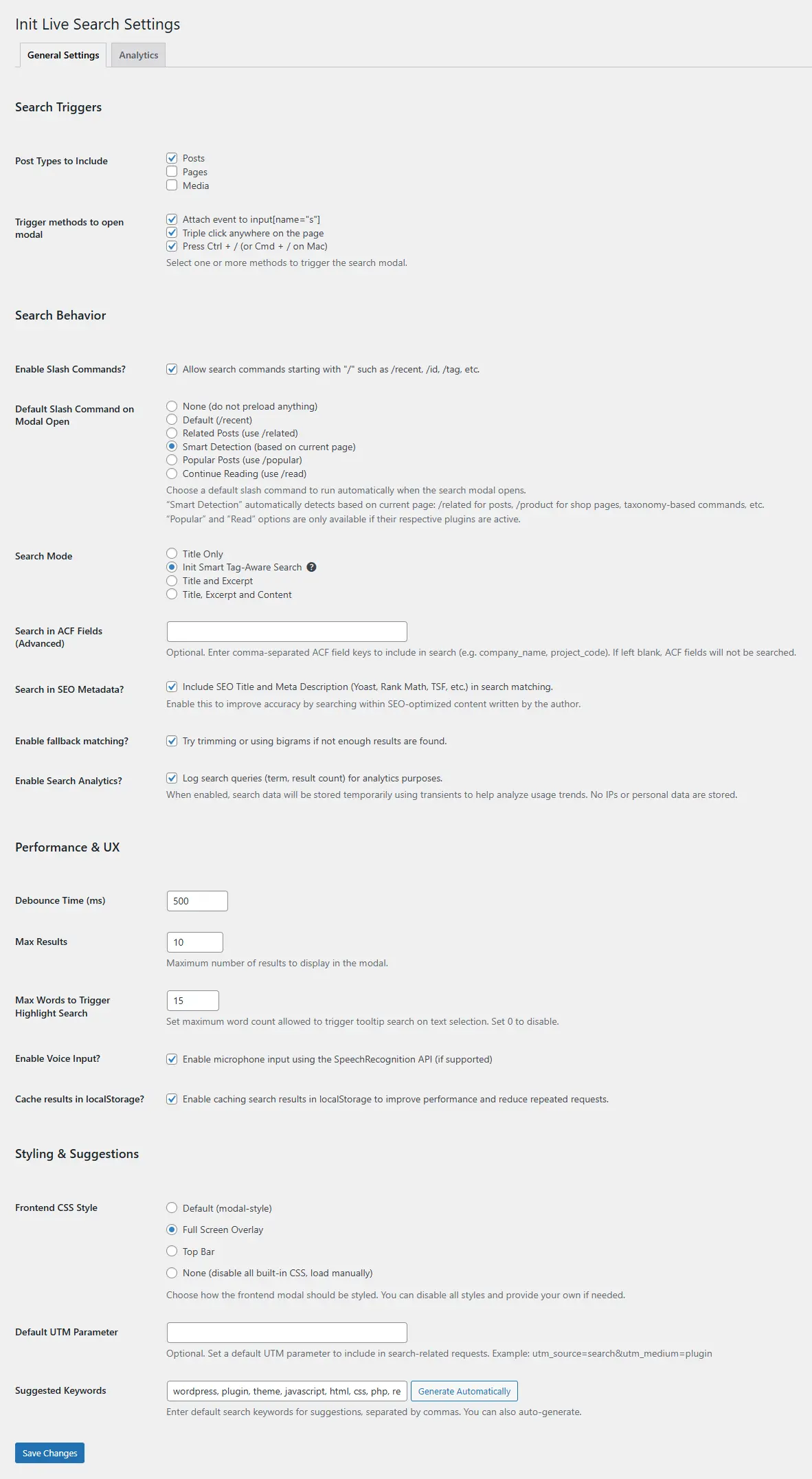
- Select which post types to search:
post,page, or any public custom post type - Choose one or more modal trigger methods: focus on
input[name="s"], triple-click anywhere, or press Ctrl/Cmd + / - Enable or disable Slash Commands — supports commands like
/recent,/tag,/product, etc. - Define a default slash command that runs automatically when the modal opens — e.g.,
/recentor/product - Select search mode: title only, title + excerpt, title + content, or Init Smart Tag-Aware Search (matches post titles and tags, this mode is ideal for short, keyword-heavy content — especially tags like
php,seo, orcss) - Enter a list of ACF field keys for advanced field-based search — e.g.,
company_name, project_code - Enable SEO metadata search — supports plugins like Yoast, Rank Math, AIOSEO, The SEO Framework, and SEOPress
- Enable smart fallback — automatically trims keywords or uses bigrams when few results are found
- Customize search delay (debounce) from 100–3000ms to balance speed and server load
- Limit the number of results shown in the modal (1–100)
- Set the maximum number of words allowed for triggering Quick Search tooltip (0–20, set to 0 to disable)
- Enable or disable voice input using the SpeechRecognition API (if supported)
- Enable caching of search results in
localStorageto reduce repeated API calls - Select frontend CSS preset: default modal, full-screen overlay, topbar UI, or disable all styles to use your own
- Optionally append a default UTM parameter to all search result links (e.g.,
utm_source=search) - Enter or auto-generate default suggested keywords for instant search hints
Technology Stack
- Vanilla JavaScript: Entire frontend logic written in pure JavaScript — no jQuery or external frameworks
- Custom REST API: Uses standardized endpoints under a dedicated namespace
initlise/v1 - Modular architecture: JS source code is organized by function: trigger, command, rendering, API, etc.
- Zero external dependencies: No third-party libraries — everything is self-contained
- Icons & images: Uses inline SVG and customizable fallback thumbnails via filters
- Global config: Define behavior through
window.InitPluginSuiteLiveSearchConfig - Theme override support: Fully override styles via
init-live-search/style.cssin your theme - LocalStorage-first: Leverages localStorage for caching, slash command history, favorites, and session state
Source Code & Development
Init Live Search is an open-source plugin actively maintained on GitHub. You can follow the development process, get early access to updates, or contribute ideas, report bugs, and suggest new features directly on the repository.
- Official repository: github.com/brokensmile2103/init-live-search
- Click Star to support the plugin — it helps increase visibility in the open-source community.
- Use the Issues tab to report bugs or request new features.
Installation & Usage
- Install and activate the plugin as you would any standard plugin.
- It works automatically on all
<input name="s">search fields. - You can open the search modal via Ctrl + / or a triple-click anywhere blank.
- Configure keyword suggestions via Settings → Init Live Search.
For Developers
Init Live Search is built with extensibility in mind, making it easy for developers to integrate deeply into custom themes or other plugins.
- Filters & Hooks: The plugin offers numerous filters to customize search results, suggestions, taxonomy filters, and output structure. See details in Using Filters in Init Live Search.
- JavaScript Events: Custom events like
ils:modal-opened,ils:results-loaded, andils:search-startedare triggered during runtime. Useful for tracking, analytics, or integrating with custom UI. Learn more at Using JavaScript Events in Init Live Search. - Customizable UI: Choose from built-in presets, override styles via
style.cssin your theme, or disable all CSS and build your own from scratch. See the Init Live Search UI customization guide. - REST API: The search data is returned through a standardized REST endpoint at
/initlise/v1/search. You can call this endpoint manually with JavaScript. Full list at Init Live Search REST API Reference. - Slash Command System: Supports intuitive command-like queries such as
/recent,/id,/tagand more. Learn how to use them in Using Slash Commands in Init Live Search. - Advanced Triggers: The modal can be opened using keyboard shortcuts, triple-click, input focus, URL (deep link), text selection, or elements with
data-ils. See the full list at All Ways to Open the Init Live Search Modal. - Headless & Static Sites: The plugin works seamlessly with headless WordPress setups or static site generators like Hugo, Astro, or Next.js. See the full integration guide at How to Integrate Init Live Search with Headless or Static Sites.
- CDN Cache Optimization: You can cache slash command results using Cloudflare Cache Rules to reduce server load while keeping the search experience lightning-fast. Learn how in Cloudflare Cache Rules for Init Live Search.
- Global JavaScript Config: Use
window.InitPluginSuiteLiveSearchto dynamically control plugin behavior without touching the source code. - Modular Codebase: The codebase is clearly divided into modules for REST API, suggestion engine, modal UI, filters, triggers, and cache — making it clean and easy to extend.
- Theme-Specific Styling: You can fully override plugin styles by placing a
init-live-search/style.cssfile inside your theme directory.
Because the logic is not tightly coupled, developers can easily build advanced integrations such as WooCommerce product search, custom taxonomy filters, or template-level shortcode enhancements.
If you’re just getting started or want to explore further, don’t miss the Init Live Search Complete Series – a curated collection of articles covering everything from the basics to advanced use cases of the plugin.
Support
If you like the plugin, consider starring it on GitHub — your support helps keep it visible in the open-source community! We welcome all ideas, feedback, and bug reports — let’s make search on WordPress smarter together!